
SQL JOIN Diagram & Cheat Sheet: Explained with a Party
A visual quick-reference guide, written out in words. Every query below keeps its matching row pairs; the OUTER joins also keep unmatched rows from the chosen side or sides.
SQL Sip is also a daily game
Once the JOINs feel friendly, there's a fresh query waiting every day — you build it by placing tiles, no timers, no pressure. Today's sip is always free.
Play today's sip →1. Bear-ista's Birthday Party
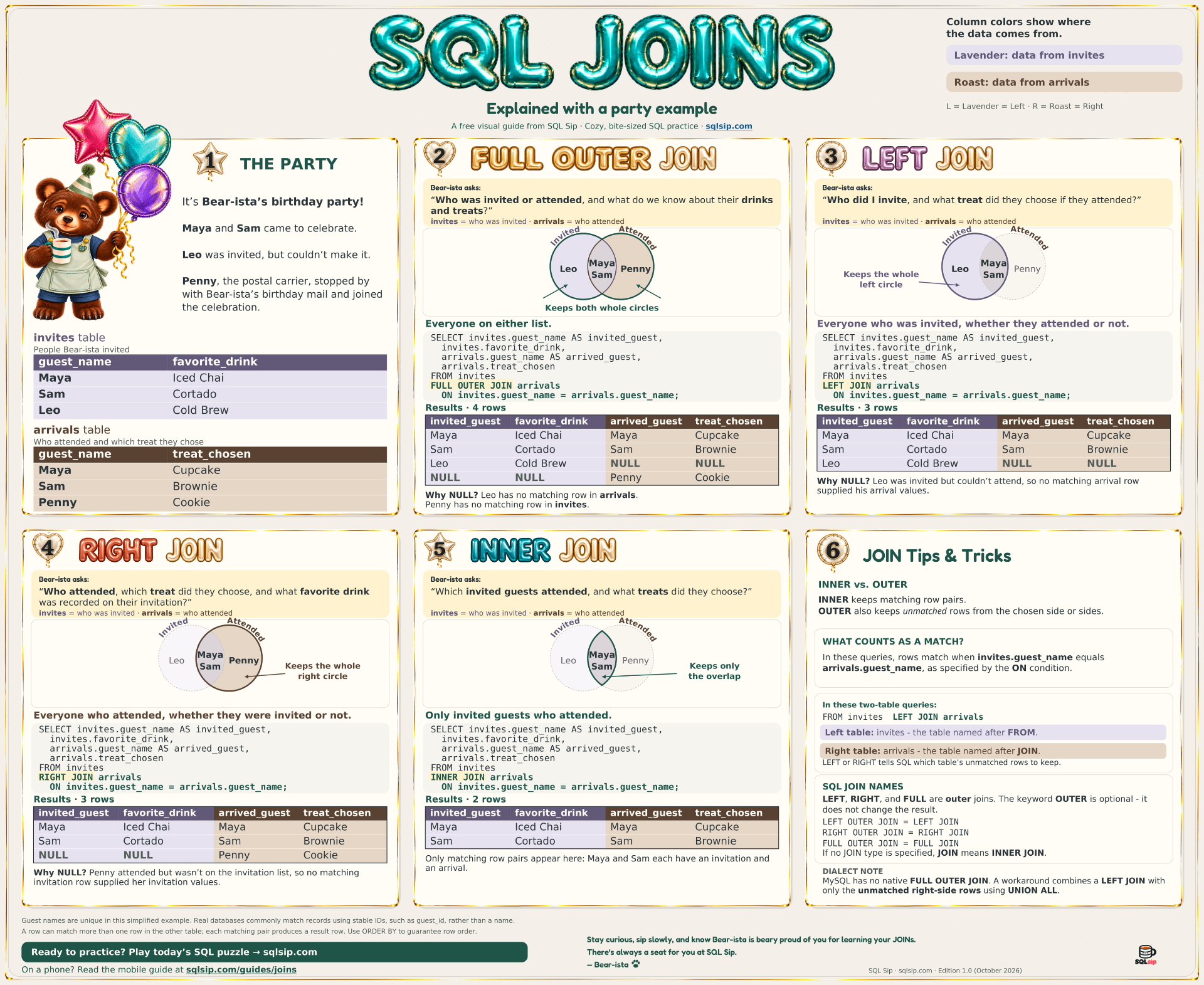
It's Bear-ista's birthday party! Maya and Sam came to celebrate. Leo was invited but couldn't make it. Penny, the postal carrier, stopped by without an invitation — and got a party hat.
We match guests by guest_name: rows match when invites.guest_name equals arrivals.guest_name, as specified by the ON condition. Guest names are unique in this example; real databases commonly use stable IDs such as guest_id.
Columns from invites are the left table; columns from arrivals are the right table.
| guest_name | favorite_drink |
|---|---|
| Maya | Iced Chai |
| Sam | Cortado |
| Leo | Cold Brew |
| guest_name | treat_chosen |
|---|---|
| Maya | Cupcake |
| Sam | Brownie |
| Penny | Cookie |
Every query below has the same shape. Replace [JOIN TYPE] with one of the four JOIN types.
SELECT invites.guest_name AS invited_guest,
       invites.favorite_drink,
       arrivals.guest_name AS arrived_guest,
       arrivals.treat_chosen
FROM invites
[JOIN TYPE] arrivals
ON invites.guest_name = arrivals.guest_name;2. FULL OUTER JOIN — Everyone on either list
Bear-ista's question: who was on either list? Diagram: both circles and the overlap are kept.
SELECT invites.guest_name AS invited_guest,
       invites.favorite_drink,
       arrivals.guest_name AS arrived_guest,
       arrivals.treat_chosen
FROM invites
FULL OUTER JOIN arrivals
ON invites.guest_name = arrivals.guest_name;| invited_guest | favorite_drink | arrived_guest | treat_chosen |
|---|---|---|---|
| Maya | Iced Chai | Maya | Cupcake |
| Sam | Cortado | Sam | Brownie |
| Leo | Cold Brew | NULL | NULL |
| NULL | NULL | Penny | Cookie |
Why NULL? Leo has no matching row in arrivals. Penny has no matching row in invites. Maya and Sam matched on both lists.
3. LEFT JOIN — Everyone who was invited, whether they attended or not
Bear-ista's question · Start with invites. Diagram: keeps the whole left circle, including the overlap.
SELECT invites.guest_name AS invited_guest,
       invites.favorite_drink,
       arrivals.guest_name AS arrived_guest,
       arrivals.treat_chosen
FROM invites
LEFT JOIN arrivals
ON invites.guest_name = arrivals.guest_name;| invited_guest | favorite_drink | arrived_guest | treat_chosen |
|---|---|---|---|
| Maya | Iced Chai | Maya | Cupcake |
| Sam | Cortado | Sam | Brownie |
| Leo | Cold Brew | NULL | NULL |
Why NULL? Leo was invited but couldn't attend, so no matching arrival row supplied his arrival values.
4. RIGHT JOIN — Everyone who attended, whether they were invited or not
Keep arrivals to include everyone who attended. Diagram: keeps the whole right circle, including the overlap.
SELECT invites.guest_name AS invited_guest,
       invites.favorite_drink,
       arrivals.guest_name AS arrived_guest,
       arrivals.treat_chosen
FROM invites
RIGHT JOIN arrivals
ON invites.guest_name = arrivals.guest_name;| invited_guest | favorite_drink | arrived_guest | treat_chosen |
|---|---|---|---|
| Maya | Iced Chai | Maya | Cupcake |
| Sam | Cortado | Sam | Brownie |
| NULL | NULL | Penny | Cookie |
Why NULL? Penny attended but wasn't on the invitation list, so no matching invitation row supplied her invitation values.
5. INNER JOIN — Only invited guests who attended
Diagram: keeps only the overlap.
SELECT invites.guest_name AS invited_guest,
       invites.favorite_drink,
       arrivals.guest_name AS arrived_guest,
       arrivals.treat_chosen
FROM invites
INNER JOIN arrivals
ON invites.guest_name = arrivals.guest_name;| invited_guest | favorite_drink | arrived_guest | treat_chosen |
|---|---|---|---|
| Maya | Iced Chai | Maya | Cupcake |
| Sam | Cortado | Sam | Brownie |
Only matching row pairs appear here: Maya and Sam each have an invitation and an arrival.
6. SQL JOIN names and dialect notes
LEFT, RIGHT, and FULL are outer joins. The keyword OUTER is optional — it does not change the result.
LEFT OUTER JOIN = LEFT JOIN · RIGHT OUTER JOIN = RIGHT JOIN · FULL OUTER JOIN = FULL JOIN. If no JOIN type is specified, JOIN means INNER JOIN.
A row can match more than one row in the other table; each matching pair produces its own result row. Use ORDER BY to guarantee row order.
MySQL has no native FULL OUTER JOIN. A workaround combines a LEFT JOIN with only the unmatched right-side rows using UNION ALL.
Ready to practice?
Play today's SQL puzzleStay curious, sip slowly, and know Bear-ista is beary proud of you for learning your JOINs.
There's always a seat for you at SQL Sip.
— Bear-ista 🐾